—

Hyper Stat, HEXA Stat & Legion Artifact

One optimizer with three tabs — Hyper Stat points, HEXA Stat node types and levels, and Legion Artifact crystals — ranked against your saved build.

Covers Optimizer, Hyper Stat Optimizer, HEXA Stat Calculator, Legion Artifact Optimizer

One optimizer, three tabs

The Optimizer carries three tabs — Hyper, Hexa, and Legion, for Hyper Stat, HEXA Stat, and Legion Artifact — each with its own standalone page: the Hyper Stat Optimizer, the HEXA Stat Calculator, and the Legion Artifact Optimizer.
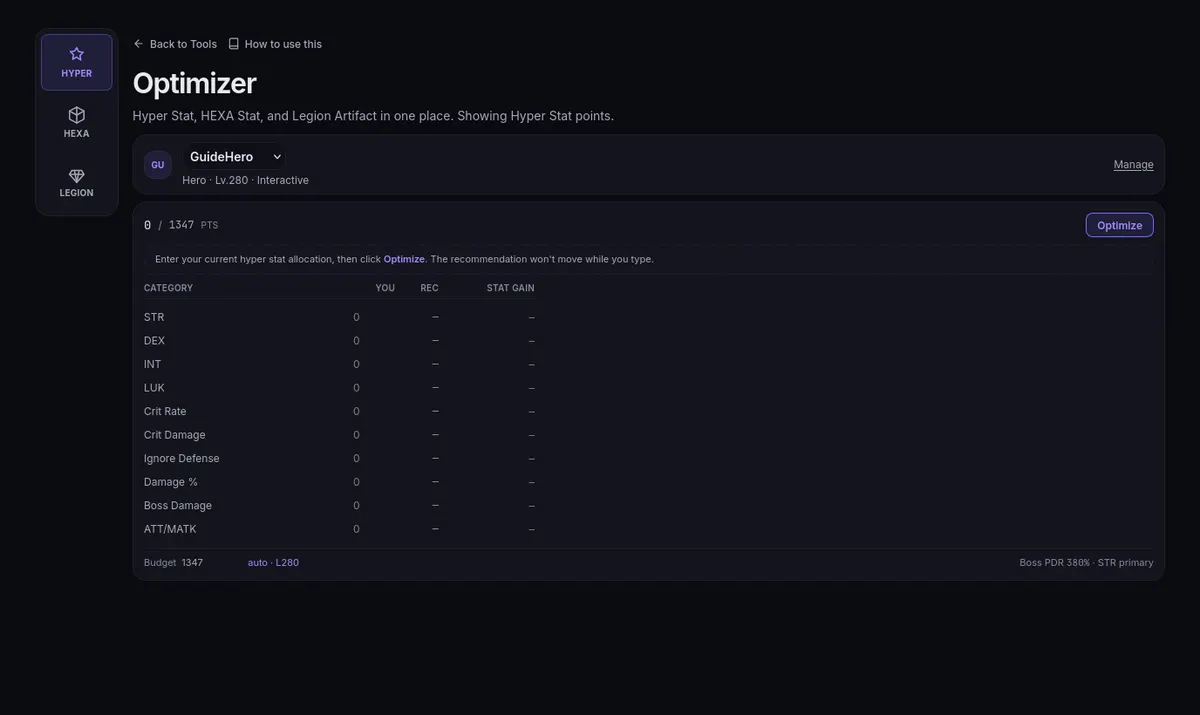
The optimizer on its Hyper Stat tab: your points per stat and the Optimize button, with the HEXA and Legion tabs on the leftThe optimizer on its Hyper Stat tab: your points per stat and the Optimize button, with the HEXA and Legion tabs on the left

Before any tab computes, line up the character: active build, class, level, stats, and crit (covered by the character setup guide). Every recommendation is judged against what it can see; a stale Gear entry skews all three tabs.

What each recommendation means

All three tabs rank by Final Damage for your character — what another unit of the resource buys on this build. It answers damage only, not farming speed or your meso calendar. The ranking moves with everything typed on Gear; re-run after a meaningful change and treat a plan as a snapshot, not a standing order. Where a suggestion does not fit, the page says what it left out; read those notes with the plan.

Hyper Stat tab

  1. Enter your current Hyper Stat levels and check the point budget. The Budget field starts from your level (auto · L… returns to it). Categories that only raise a cap, such as DF/TF, show as reserved: they leave the damage optimizer's budget and are kept where you put them, so record those accurately too.
  2. Choose Optimize to calculate a recommendation. Editing inputs does not refresh it — the result is marked stale; use Re-optimize after changes.
  3. Review the proposed allocation and gain. Apply records it in the tracker, and Undo reverses that tracker change. These controls do not allocate points in MapleStory; keep your in-game allocation and recorded allocation consistent.
  4. A Critical Rate row marked held means the optimizer left that level alone because your entered crit rate cannot show how much of it is free. Enter your exact rate and any Over cap by % on Gear (see Over-cap crit); with a known excess, Hyper Stat can free part of the crit points.

Hexa Stat tab

Enter each node's main and sub stat types with their enhancement levels; the tab notes that these lines are already included in your stats, so entering them does not raise your score. Optimize answers with Best stat types for your levels — suggestions matched to the levels you already have, not a re-roll plan. Retyping existing enhancements differs from enhancing again at random, so the expected gains and fragment costs are separate readings. Hexa Sunday toggles the event's effect on reroll estimates.

The standalone HEXA Stat Calculator reads the nodes saved on the HEXA page's Stat tab and does not edit them.

Boundaries: this tab is not the Matrix node pricing problem (the Sol Erda Calculator covers those levels), and not every candidate is judged by damage-per-fragment.

Legion Artifact tab

AP means Artifact Points here, not attack power.

  1. Enter your Artifact level: it sets the open slots and the AP budget — there is no manual AP field, the level is the input.
  2. On Your board, click a slot to set that crystal's level and bonus entries.
  3. Compare against Greedy recommendation, which lists Final Damage, AP allocated, and AP to upgrade; Top moves is the shortcut for the strongest next steps.

Critical Rate stays out of the ranking until its exact status-window total is entered on Gear. The plan is an estimate; if a panel warns the budget cannot be met, fix the inputs and run again.

Mistakes and interpretation

  1. Optimizing a stale build: every tab reads the same snapshot, so one old stat bends the plan.
  2. Comparing plans with a friend's without identical level, class, stats, and budget.
  3. Treating budget warnings as noise — they usually flag an input disagreeing with reality.
  4. Treating a plan as permanent. Recalculate after a gear change to check whether the best allocation changed.